 Instant Media
 en
en Русский
Statistics and logs
See what the bot has done in your group, without scrolling the chat.
The chat-settings screen in the mini app opens with the group's usage at the top, followed by two views you can switch to.
Traffic
Paid groups see their weekly traffic used so far against the plan's quota; free groups see a notice explaining that delivery is cache-only instead, since traffic limits don't apply to them.
Incoming links
Every link the bot has processed for the chat, in order, with its status:
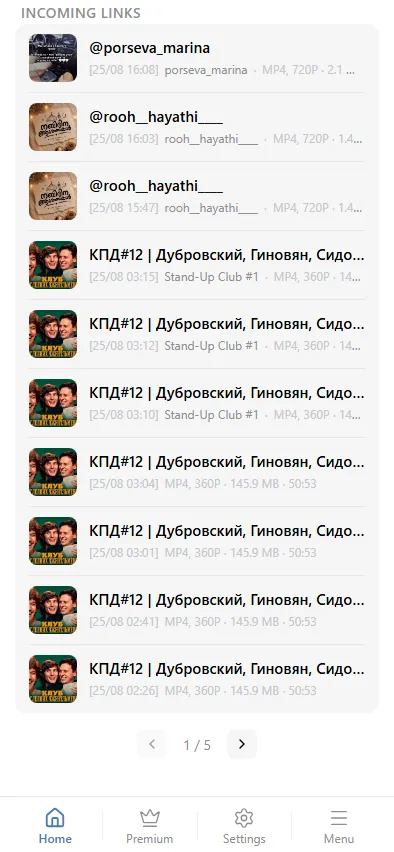
- downloaded / cached — delivered successfully, freshly downloaded or from the shared cache.
- skipped — the link was not eligible (free-plan cache miss, or an admins-only block).
- error — the download failed; the source may be unavailable or removed.
- queued / downloading — still in progress.
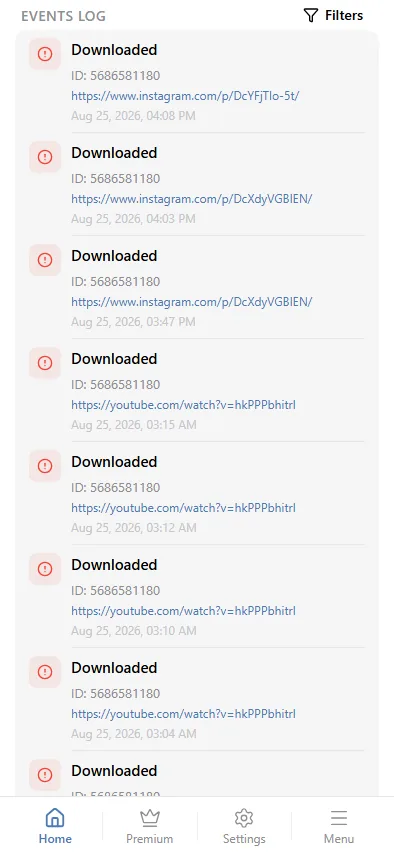
Events log
A separate, filterable log of notable events for the chat — unsupported links, cache misses, download failures, admins-only blocks, and weekly-limit hits:
Team
Multiple Telegram accounts can be added to a group's team, so more than one person can manage its settings and see its logs from their own private chat with the bot.